EWA Release 40.4.0
Version 40.4.0 stable: Component Versions
Version 40.4.0 stable of EWA was released to customers on June 25th 2026.
The compatible versions of the affected runtime components are listed below:
| Component | Version |
|---|---|
| Chat Server | 26.4.293.0 |
| Client Application | 26.6.32.0 |
| Client Hub | 26.6.162.0 |
| Data Warehouse Export Service | 26.6.98.0 |
| EOC Integration | 26.6.98.0 |
| Export Service | 26.6.101.0 |
| Insights API | 26.6.102.0 |
| Form Module API | 26.6.5.0 |
| HP Link Patient Identity API | 26.6.92.0 |
| Insights Web | 26.6.111.0 |
| LiveView API | 26.6.910.0 |
| Medical Unit Broker | 26.5.13.0 |
| Migration and Seeding Tool | 26.6.98.0 |
| Personnel Registration API | 26.5.5.0 |
| Version Manager API | 26.4.293.0 |
| Version Manager Client Installer | 26.1.286.0 |
Version 40.4.0 stable: New Features
Patient National Id System 2.0
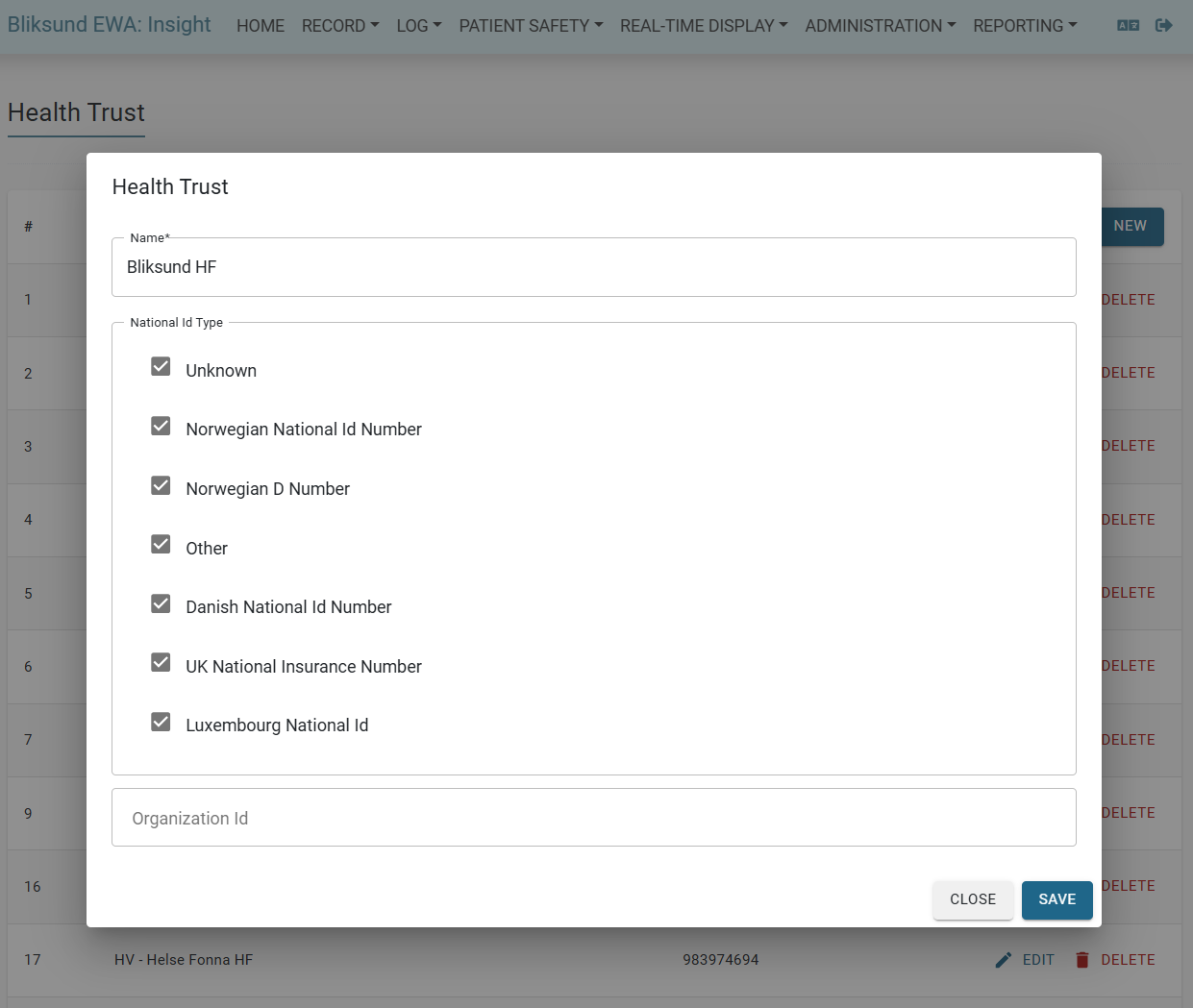
The Patient National Id System 2.0 feature allows administrators to configure which national ID types are available for each health trust in the EWA system.
This provides flexibility for multi-national deployments and ensures users only see relevant ID types for their region.
Key features:
-
Feature controlled by "Patient National Id System 2.0" feature flag in Insight → Administration → Features

-
Administrators can configure which national ID types are available for each health trust in Insight → Administration → Health Trust
-
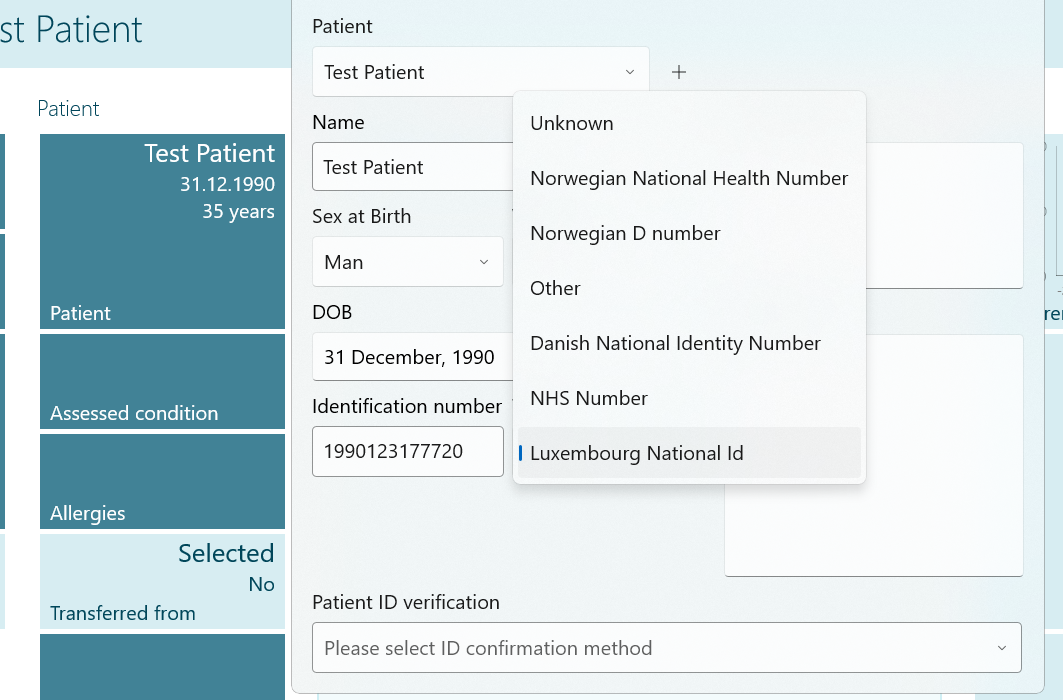
Configured ID types are displayed in the Patient Tile dropdown in EWA Client
-
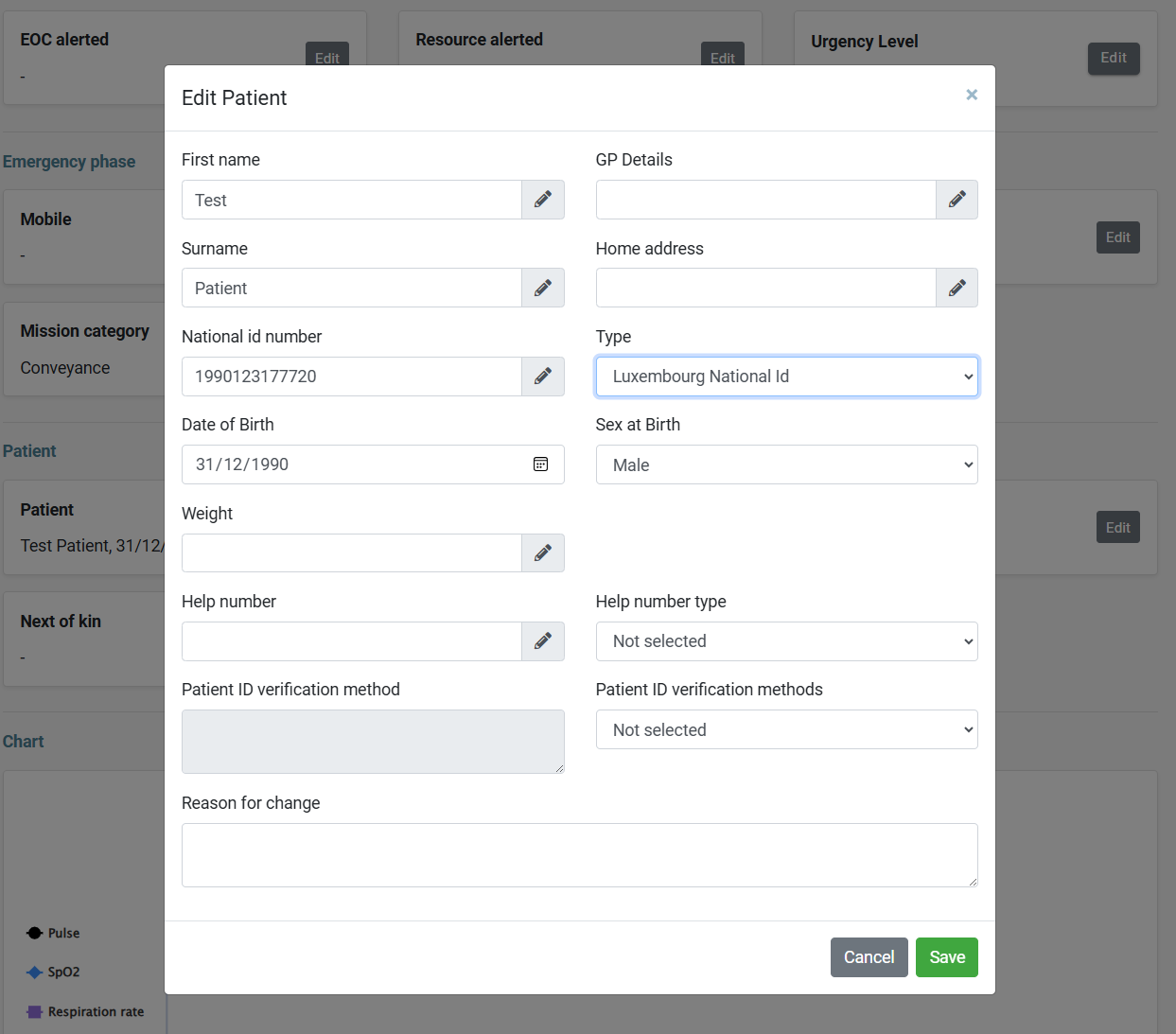
Configured ID types are displayed in the Edit Patient dialog when editing records in Insight
-
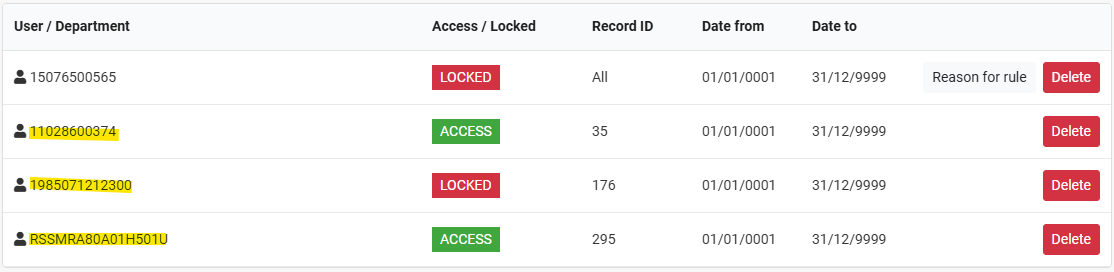
The Limit Access feature supports multi-country National IDs, not just Norwegian, which allows alphanumeric national IDs.
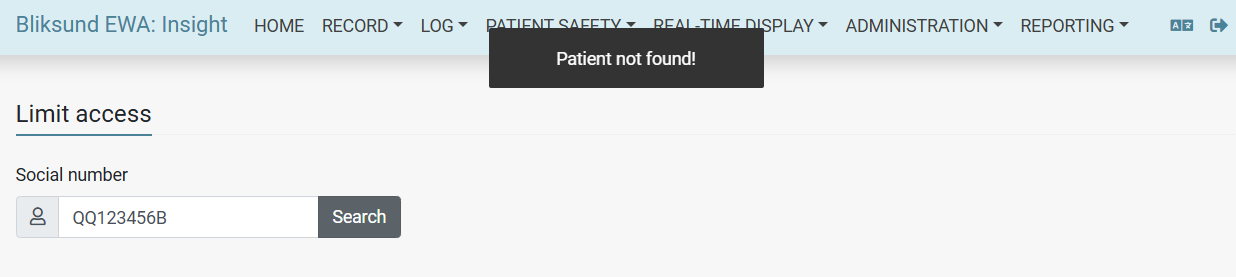
Add possibility that Export Service supports the new Patient National Id Validator
Added additional national ID types, including Danish National Id Number, UK National Insurance Number, and Luxembourg National Id Number in export configuration page, applied for DIPS, DIPS to Home, and Helseplattformen.
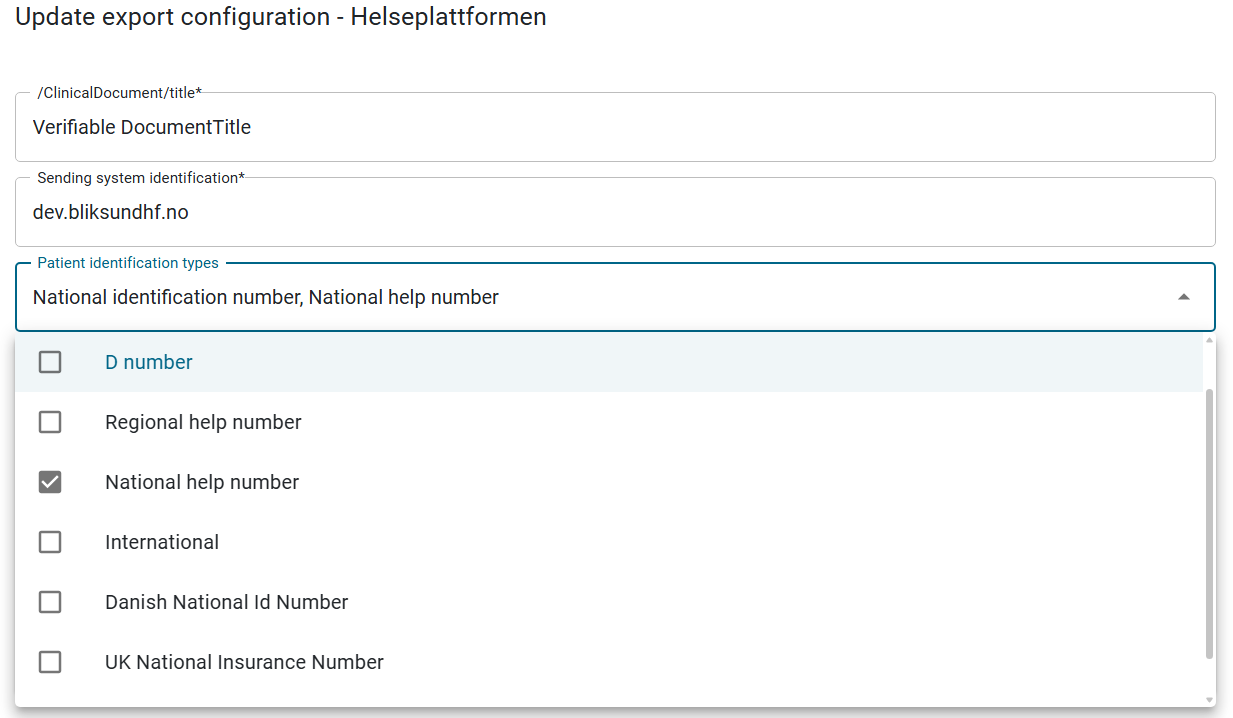
In the export service, the patient validation logic has also been updated to adjust with the selected national ID types, and support new types.
Add possibility to display older PDF records with additional national IDs
Allow to show previous records with other national IDs, not including invalid and unknown types. The records are now filtered by both National ID Number and National ID Type.
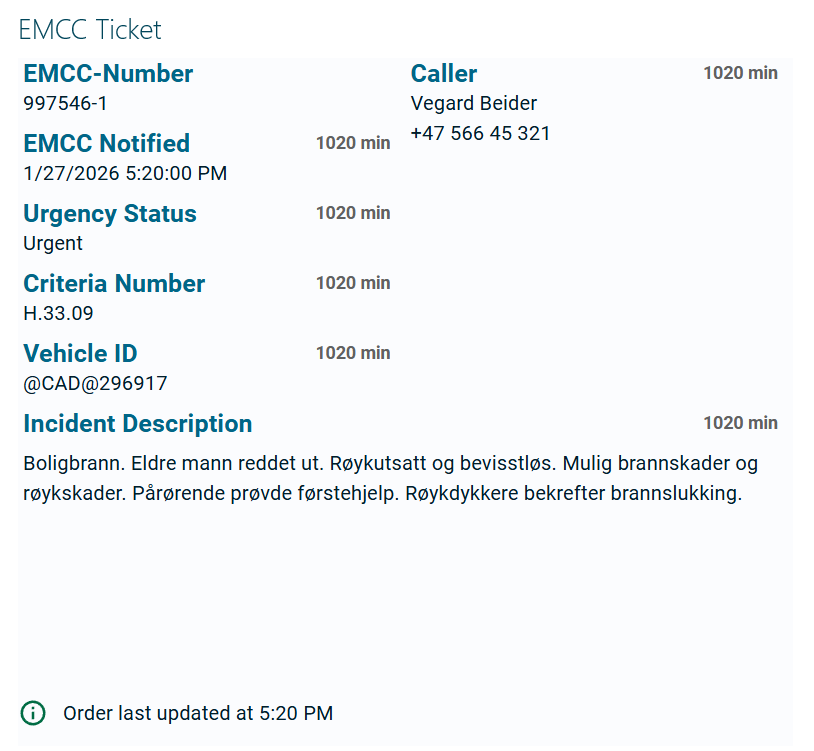
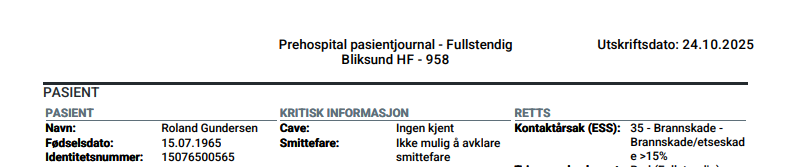
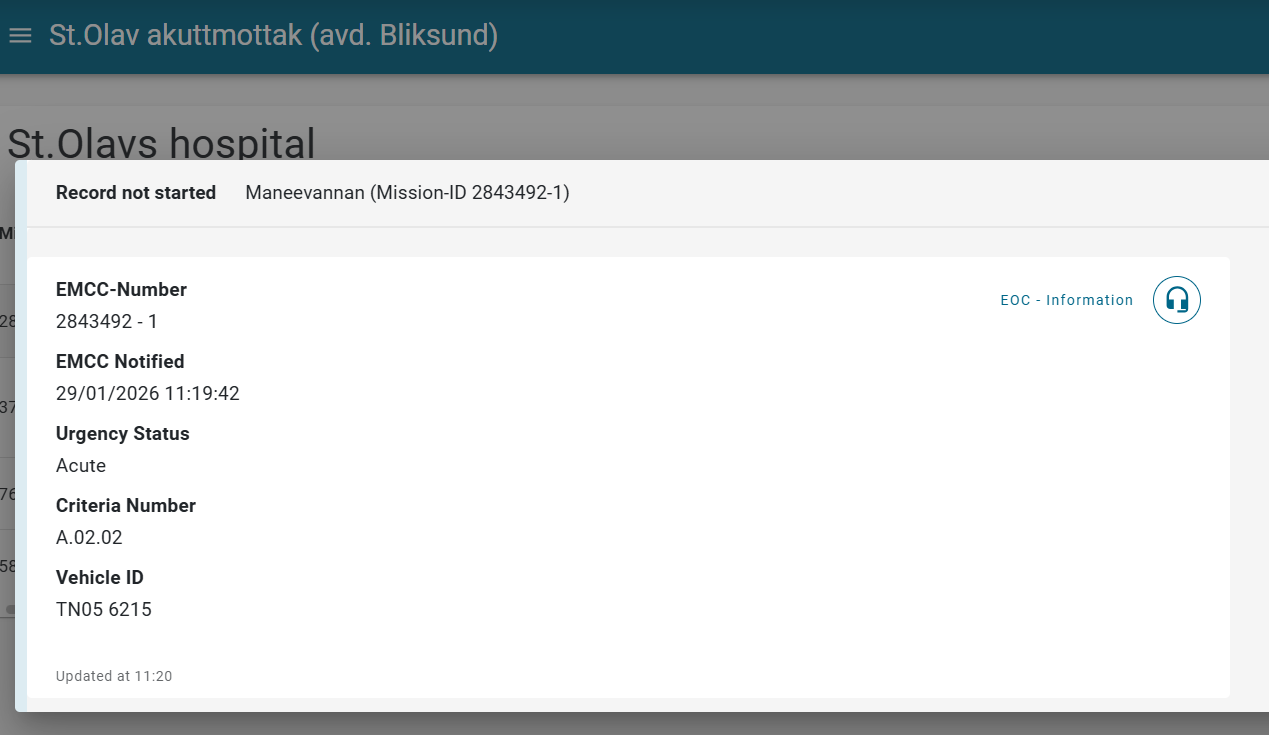
Receive Vehicle ID from EOC and display to EWA application
Introduced new vehicle data that can be sent from the EOC, then displays in EWA application, and is currently not editable. The initial version only supports vehicle IDs and is transmitted as a string. New feature is enabled via feature flag.
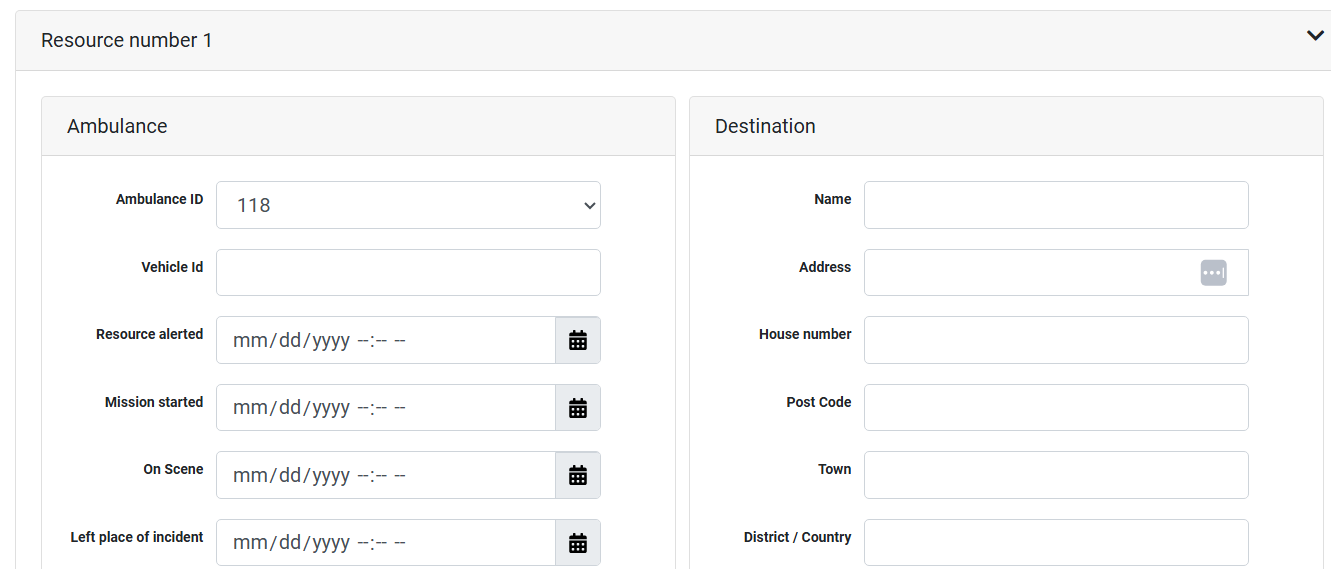
The new field is also included in simple and full simulators in Insight.
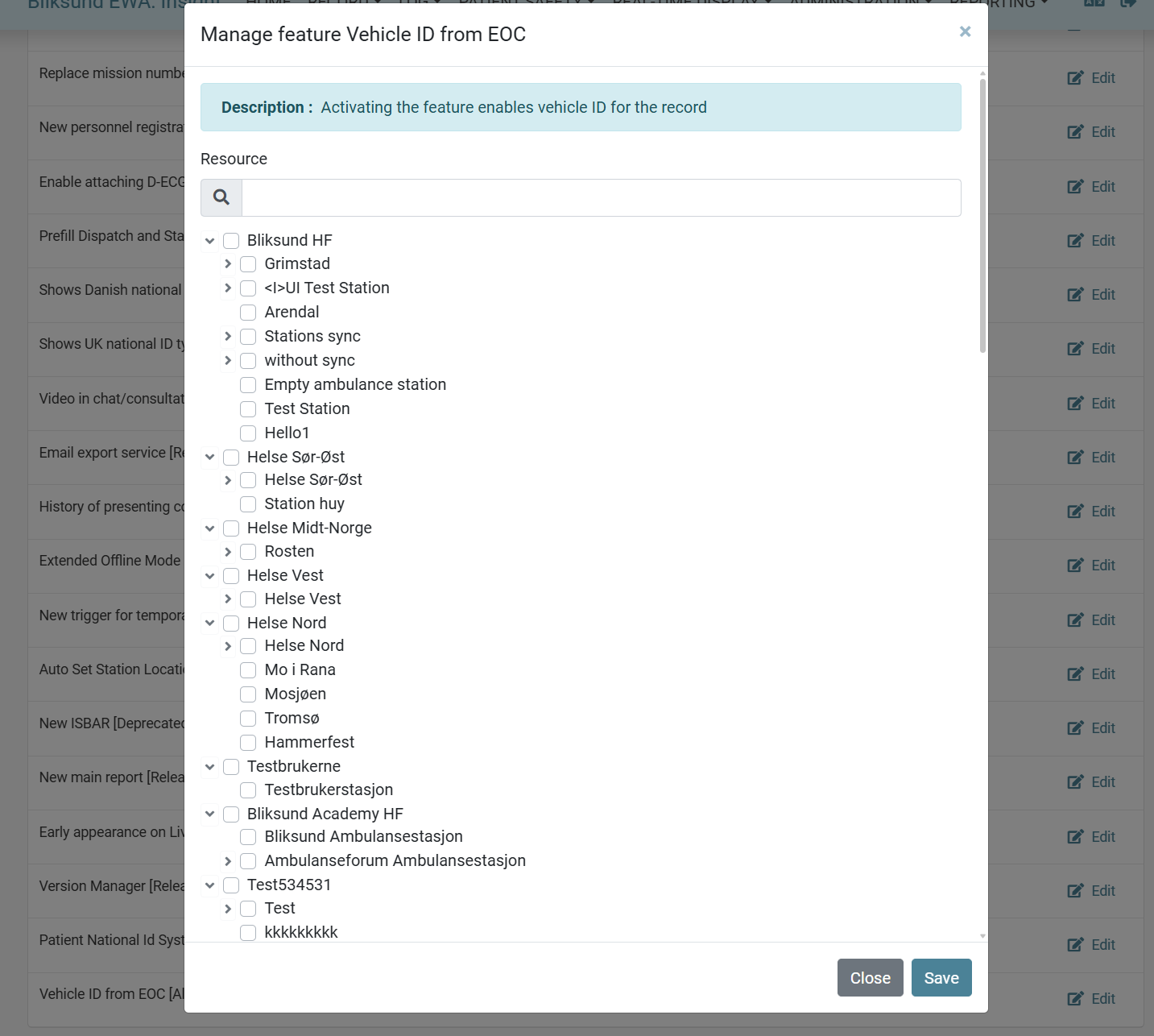
The vehicle data is shown in EMCC ticket, PDF files, and liveview pages.
Version 40.4.0 stable: Updated Features
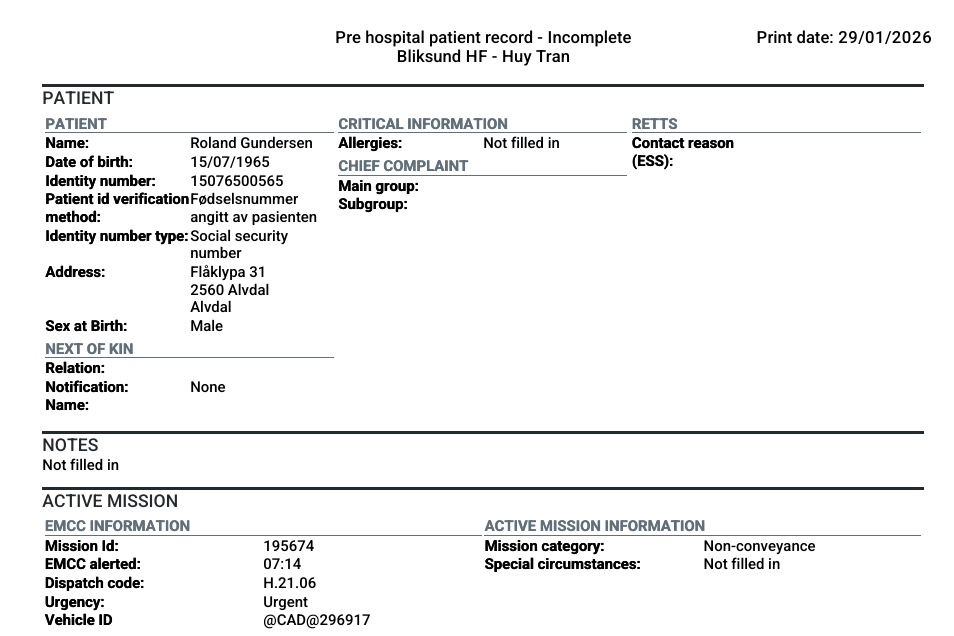
Added print date label to record PDF generation
Moved the print date from the front of the center title to the top-right corner of the PDF headers and added text label for clarity. Removed extra line between title and health trust - resource in PDF headers. Added a bit more margin between header and content in the PDF.
Migrate Location.json Base64 Environment Variable to UI Input Field
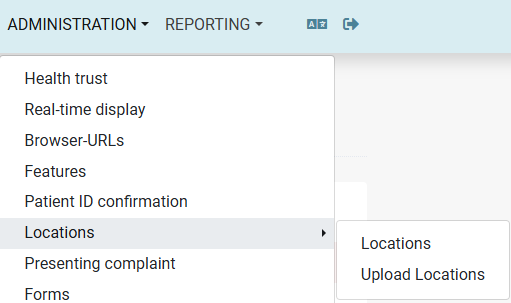
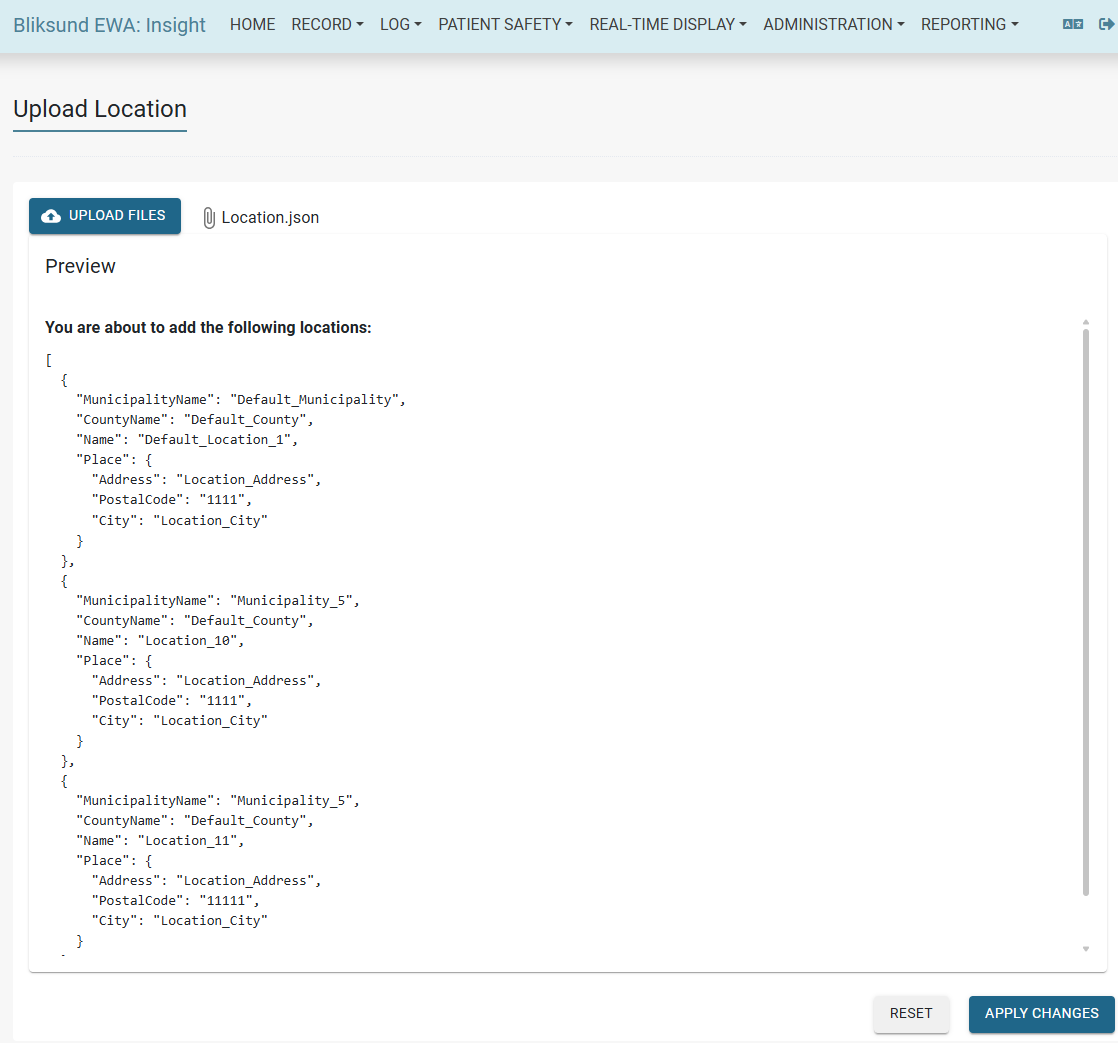
A new "Upload Locations" component has been introduced in Insight, providing the ability to upload large Location.json files directly through the UI instead of seeding them via a base64-encoded environment variable.
The new component includes the following requirements:
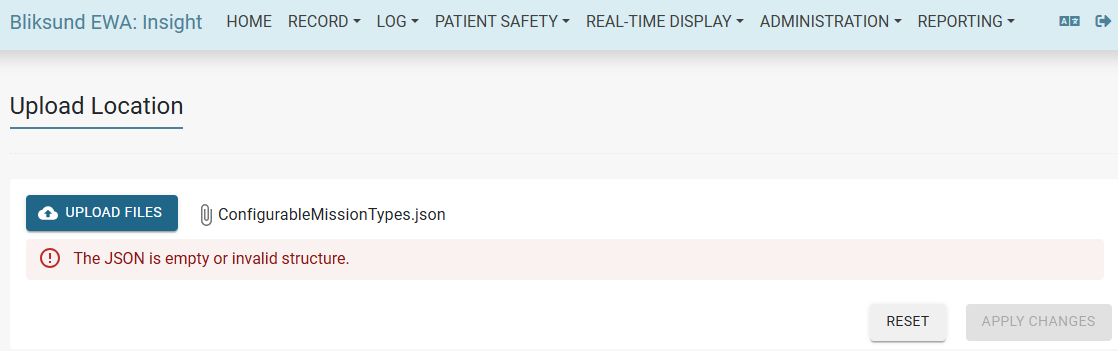
- Accept existing
Location.jsonfiles or any file with the*.jsonextension. - Validate the uploaded file to ensure it is a valid JSON with the correct structure.
- Preview the changes before applying.
- Introduce a new access right:
| Access Rights | Details |
|---|---|
| AllLocationAdmin | Required to allow access to the Upload Locations component. |
Localized names of export types in Export Status page
Added functionality to localize the names of export types in the export status page. Changed the localization of DocuLive export type to "Helseplatformen" for all supported languages.
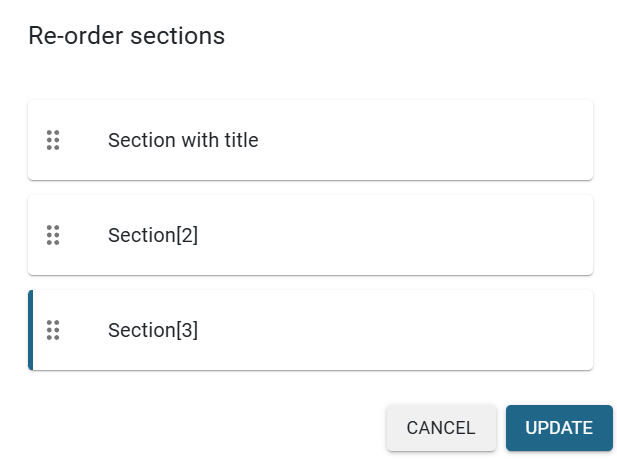
Forms - Leave section title blank
Allowed section's title to be empty, and added default placeholder to the input field instead.
In the branching configure and re-ordering sections features, the sections with empty title will have default name with fixed structure Section[{view_order}] to avoid confusion.
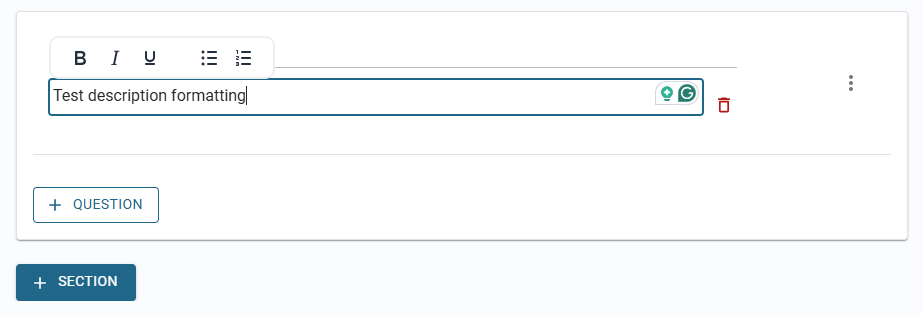
Add text formatting option section description in the Forms module and Presenting Complaint
Applying text formatting options for the section description, which includes those options:
- Bold
- Italics
- Underline
- Bullet List
- Numbered List
The new formatting implementation for the section description on both Forms and Presenting Complaint.
Liveview - ISBAR
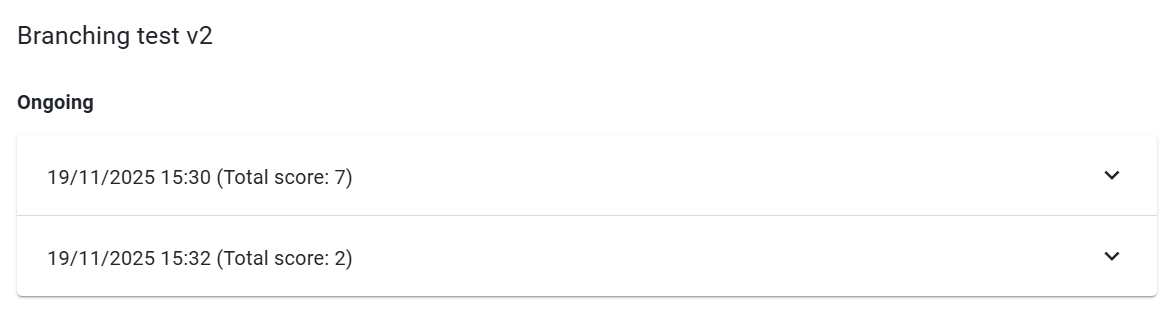
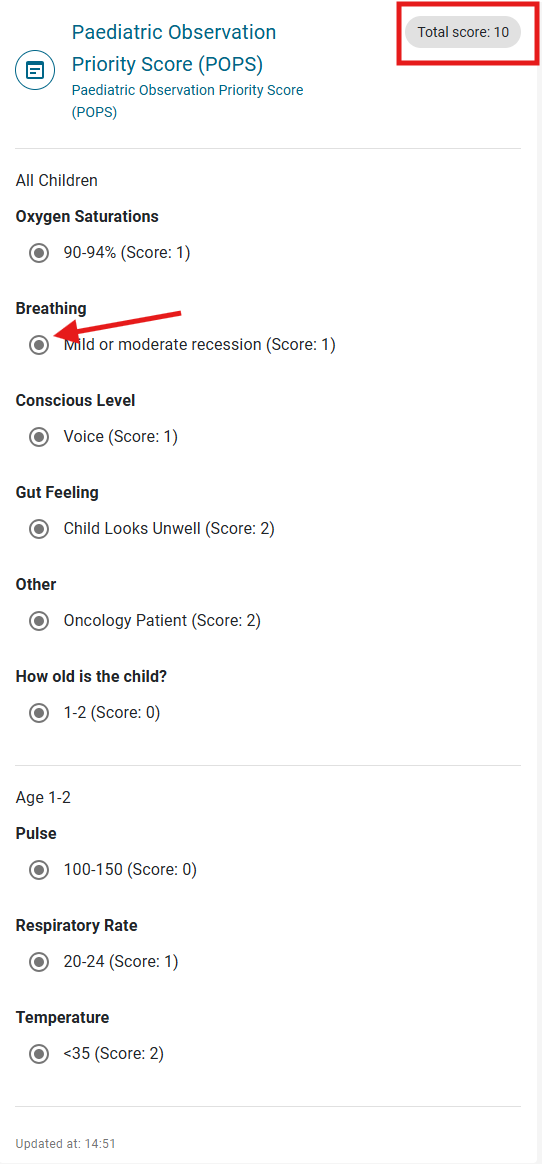
Align how scoring is shown in text in Forms
Showing score and total score value for missing pages, including:
- History of Presenting Complaint pages
- Form in ISBAR page
- Form in Insight page
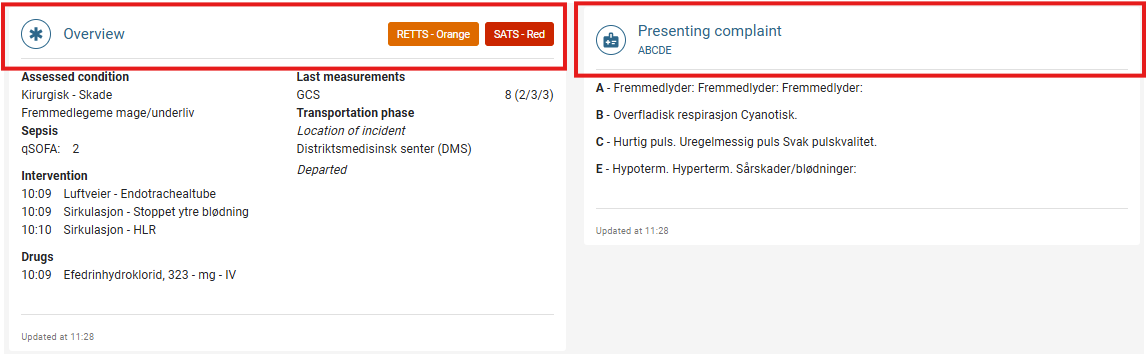
Standardize card header styling
All ISBAR cards now use a unified style format, including a consistent header design across all cards.
Display question description configured in Forms and Presenting complaint forms in LiveView ISBAR page
We have included the display of question description configured in forms and presenting complaint forms when a record is attached to a LiveView.
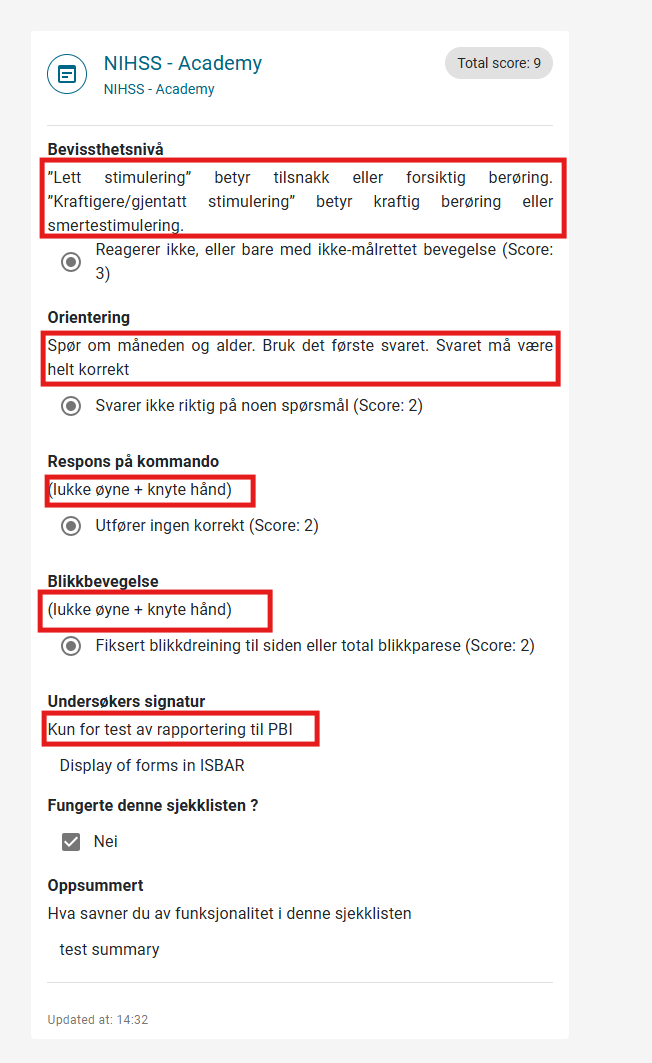
Improved Forms and presenting complaint forms display in ISBAR
We have enhanced styling, spacing and formatting in displaying Forms and history of presenting forms display in ISBAR.
Additional updates specific to the ISBAR compact view:
- Adoption of the MudCard component with the title aligned to the left.
- Display of scoring for each question alternative. Visibility of section and title descriptions.
- Improved presentation of multiple-choice options using checkboxes/radio buttons in a structured list format rather than a single long string.
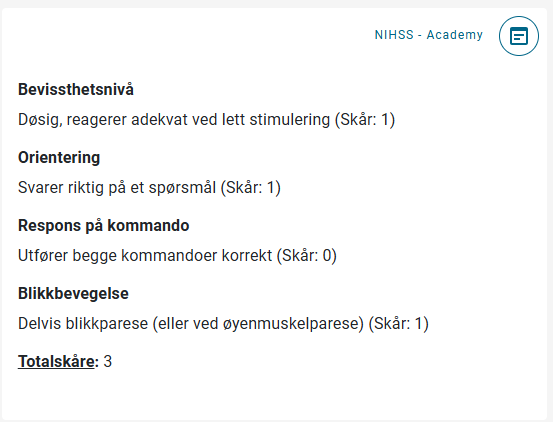
RETTS 2026 XML Support
We have tested RETTS 2026 version, the files have been fully tested, validated, and approved for use. You can upload and activate the RETTS 2026 XML files directly through the configuration page in Insight. No additional deployment steps are required.
Compatibility
The RETTS 2026 XML version has been thoroughly tested against the following EWA versions:
- 32.10
- 33.8
- 35.9
- 40.2.X(All 40.2.X releases)
- 40.4.0
SATS 2026 Upgrade
Adjust the footnote pop-up size to fit the actual width of the content
Making the pop-up size flexible, responsive to the content size, and ensuring a consistent and user-friendly experience.
Display SATS version based on SATS configuration
The SATS version used during patient triage is now consistently displayed across the EWA platform. This ensures Emergency Departments can clearly identify which SATS version was applied, enabling correct interpretation and safe clinical handover.
List of changed modules or pages: LiveView (ISBAR view), PDF / Print report, Insight record page, SATS flyout in EWA ClientApp.
What's New
- LiveView (ISBAR view): The SATS version is now visible to receiving teams directly in the ISBAR view, allowing them to see which version was used during triage.
- PDF / Print report: The SATS version is included in the exported PDF report, ensuring the version is part of the permanent patient record.
- View Record page: The SATS version used during triage is displayed on the patient record view.
- Data capture: The client application now saves the SATS version at the time of triage and transmits it to the client API for consistent storage and retrieval.
- ISBAR SATS pop-up: The unnecessary "Close" button has been removed from the SATS pop-up in the ISBAR view to streamline the user interface.
Dataset V2 Feature
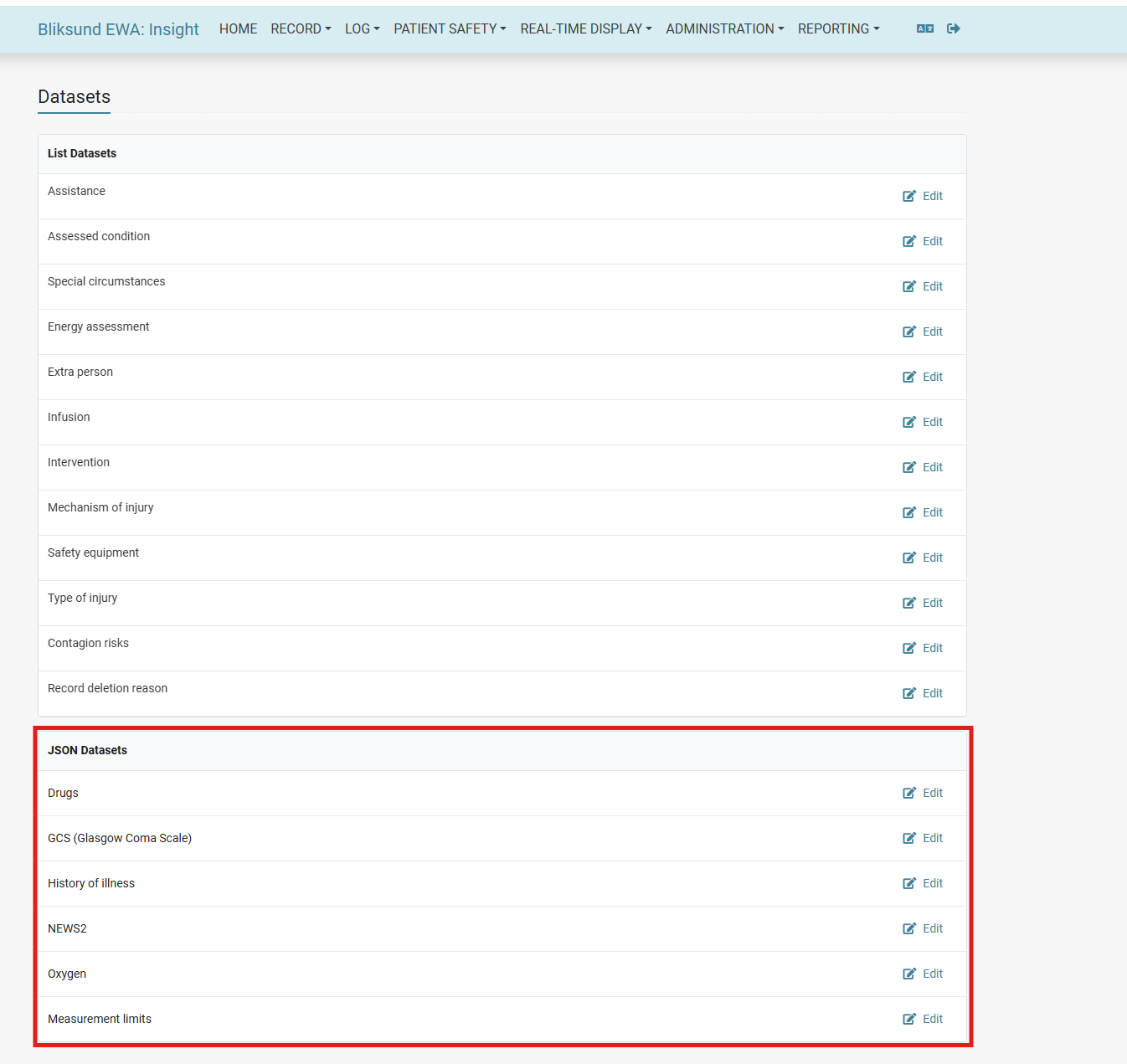
Drugs, GCS, History of Illness, Oxygen, NEWS2, and Measurement Limits have been migrated from file-based datasets to configurable entries within the Insights configuration page.
Dataset resolution follows a conditional approach:
- If the Dataset V2 feature flag is enabled and a corresponding dataset exists in the database, the dataset is retrieved from the database.
- If the feature flag is disabled, or no matching dataset is found, the system falls back to the legacy file-based datasets.
Note Restarting the client is currently required for changes made in Insights to take effect in the Client Application.
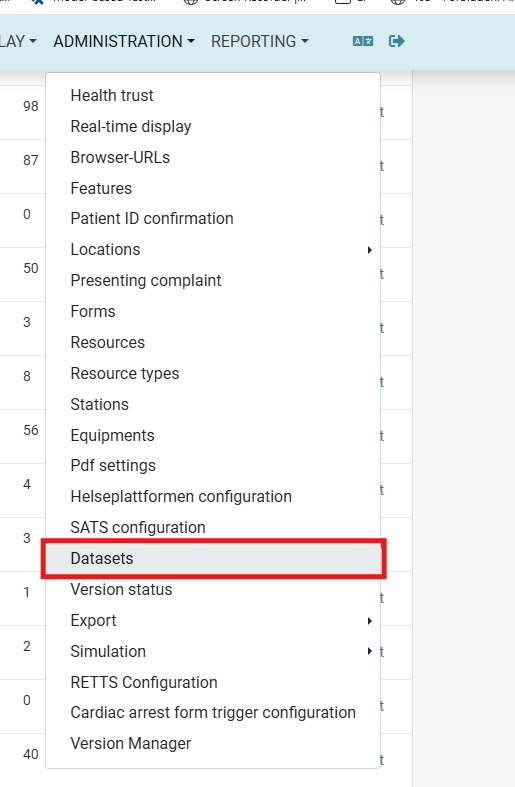
The datasets are accessible via Insight → Administration → Datasets.
The migrated datasets are listed under the JSON Datasets section on the Datasets page.
The feature is controlled by the "Dataset v2" feature flag in Insight → Administration → Features.

Version 40.4.0 stable: Fixes
No new fixes in the release.
✅ Testing Focus Areas for 40.4.0
🪪 Patient National Id System 2.0
- Verify the "Patient National Id System 2.0" feature flag can be enabled and disabled in Insight → Administration → Features without impacting existing records
- Configure a subset of national ID types for a health trust in Insight → Administration → Health Trust and confirm only those types appear in the Patient Tile dropdown in EWA Client
- Confirm that a second health trust configured with a different set of ID types shows only its own types — verify no cross-trust leakage
- Test entry and saving of Danish National Identity Number, NHS Number, and Luxembourg National Id in the Edit Patient dialog in both Insight and EWA Client
- In Limit Access, search using an alphanumeric national ID (e.g. UK or Luxembourg format) and verify the search is accepted and returns correct results
- Verify that existing rules with Norwegian numeric IDs in Limit Access continue to function after the upgrade
📤 Export Service — Patient National Id Validator
- Add Danish National Id Number, UK National Insurance Number, and Luxembourg National Id Number to the export configuration for DIPS, DIPS to Home, and Helseplattformen and confirm they are accepted and saved
- Trigger an export for a patient with each new ID type and confirm the export succeeds and the patient identity is included correctly in the export payload
- Confirm that selecting no additional ID types in export configuration does not break existing Norwegian exports
📊 Dataset V2 Configuration & Migration
Verify that Drugs, GCS, History of Illness, Oxygen, NEWS2, and Measurement Limits are no longer loaded from file-based datasets when correctly configured in the Insights configuration page Validate that updates made to datasets in Insights reflect the expected structure and values
🔁 Feature Flag Behavior
Verify that enabling the Dataset V2 feature flag correctly switches dataset retrieval to the database (Insights) Disable the feature flag and confirm the system reverts to using legacy file-based datasets
📂 Older PDF Records with Additional National IDs
- Open a pre-upgrade record containing a non-Norwegian national ID and verify it is visible and correctly displayed in the record view
- Confirm that records are filtered by both National ID Number and National ID Type — searching by number alone should not return records of a different ID type with the same number
- Verify that records with invalid or unknown national ID types are excluded from search results
🚗 Vehicle ID from EOC
- Enable the Vehicle ID from EOC feature flag in Insight and confirm it activates for the assigned resources
- Simulate an EOC dispatch carrying a Vehicle ID string and confirm the value appears in the EWA Client record (non-editable)
- Verify the Vehicle ID is visible in the EMCC ticket, the PDF report, and the LiveView page
- Test using the simple and full simulators in Insight to confirm the Vehicle ID field is included and populates correctly
- Confirm that when no Vehicle ID is sent from EOC, the field is absent or blank and no errors are shown
🖨️ Print Date Label in PDF
- Generate a full and an incomplete PDF and confirm the print date label ("Print date:") appears in the top-right corner of each page header
- Verify there is no extra blank line between the center title and the health trust / resource line in the header
- Confirm that the margin between the header and the record content is visually consistent and adequate
📍 Upload Locations
- Log in as a user without the
AllLocationAdminaccess right and confirm the Upload Locations menu item is not visible - Log in as a user with
AllLocationAdminand upload a validLocation.json— verify the preview shows the correct locations before applying - Upload a malformed or empty JSON file and verify the error message "The JSON is empty or invalid structure." is displayed and no changes are applied
- Apply a valid upload and confirm the new locations appear in the Locations list without duplicating existing entries
- Verify the Reset button clears the uploaded file and restores the default empty state
📝 Forms — Blank Section Title
- Create a form section with an empty title and confirm a placeholder is shown in the input field
- Open the Re-order Sections dialog for a form with blank-titled sections and verify they are labelled Section[N] using their view order
- Verify blank section titles are also labelled correctly in branching configuration
- Confirm that a section with a blank title renders correctly in the EWA Client and Insight record views
🖊️ Text Formatting in Forms and Presenting Complaint
- Apply Bold, Italics, Underline, Bullet List, and Numbered List formatting to a section description in the Forms module and confirm formatting is saved and displayed correctly
- Repeat the same formatting tests in a Presenting Complaint section description
- Verify that formatted descriptions are rendered correctly in the EWA Client, the LiveView ISBAR page, and the PDF report
- Confirm that removing formatting (toggling off) also saves and displays correctly
📊 Liveview ISBAR — Scoring and Display
- Verify that individual question scores and total scores are displayed for forms in the History of Presenting Complaint, ISBAR page, and Insight record page
- Confirm total score is shown prominently and updates correctly when answers change
- Check that all ISBAR cards use a consistent header style — verify no cards revert to an older header format
- Attach a record to a LiveView and confirm that question descriptions configured in Forms and Presenting Complaint are visible in the ISBAR page
- In the ISBAR compact view, verify: title is left-aligned in MudCard, scoring shown per question alternative, section/title descriptions are visible, and multiple-choice options display as structured checkboxes/radio buttons rather than a single string
🏥 RETTS 2026 XML Support
- Upload the RETTS 2026 XML file via the Insight configuration page and confirm it is accepted without errors
- Activate RETTS 2026 and perform a triage — verify ESS criteria, scoring, and dispatch codes function correctly
- Confirm the RETTS 2026 version label appears correctly on the record and PDF
🩺 SATS 2026 Upgrade
- Perform a patient triage using SATS 2026 and verify the correct SATS version is shown in the SATS flyout in EWA Client
- Open the record in the ISBAR LiveView and confirm the SATS version is visible to receiving teams
- Generate a PDF and confirm the SATS version is included in the print report
- View the record in Insight and confirm the SATS version displays on the record view page
- Open the SATS pop-up in the ISBAR view and confirm the "Close" button is absent
- Trigger a SATS footnote pop-up with short and long content and verify the pop-up width adjusts to fit the content in both cases
Tested Medical Devices
All versions of this release have been tested on the listed medical devices and corresponding software versions, ensuring compatibility and performance in the specified environments.
Tested Medical Devices
All versions of this release have been tested on the listed medical devices and corresponding software versions, ensuring compatibility and performance in the specified environments.
Corpuls
- Software versions: 4.4.4
- SDK version: 4.4.0.0
Zoll
- Software version: 02.36.21.00
- SDK version: 6.44.315